Same day
sign up, pay online and your CRM opens
4 documents
Quotation, CAN, Seaway BL and Payslip, as PDFs in your name
36 ports · 18 lines · 8 airlines
loaded the day you sign up
6 roles
so sales sees only its own inquiries
Inquiry to invoice,
typed once.
Each stage fills the next. The port pair on the inquiry is on the quotation; the job carries it to the CAN and the BL; finance sees the buy, sale and margin.
- InquiryPOL, POD, cargo and rate
- QuotationCharges in USD and INR
- JobVessel, voyage, ETD, ETA
- CANPrinted from the job
- Seaway BLWith your MTO licence
- InvoiceRaised or pending, per job
- FinanceBuy, sale and margin
The screens your
team works in.
Real screens from the CRM, with the sample data every new company can load to look around.
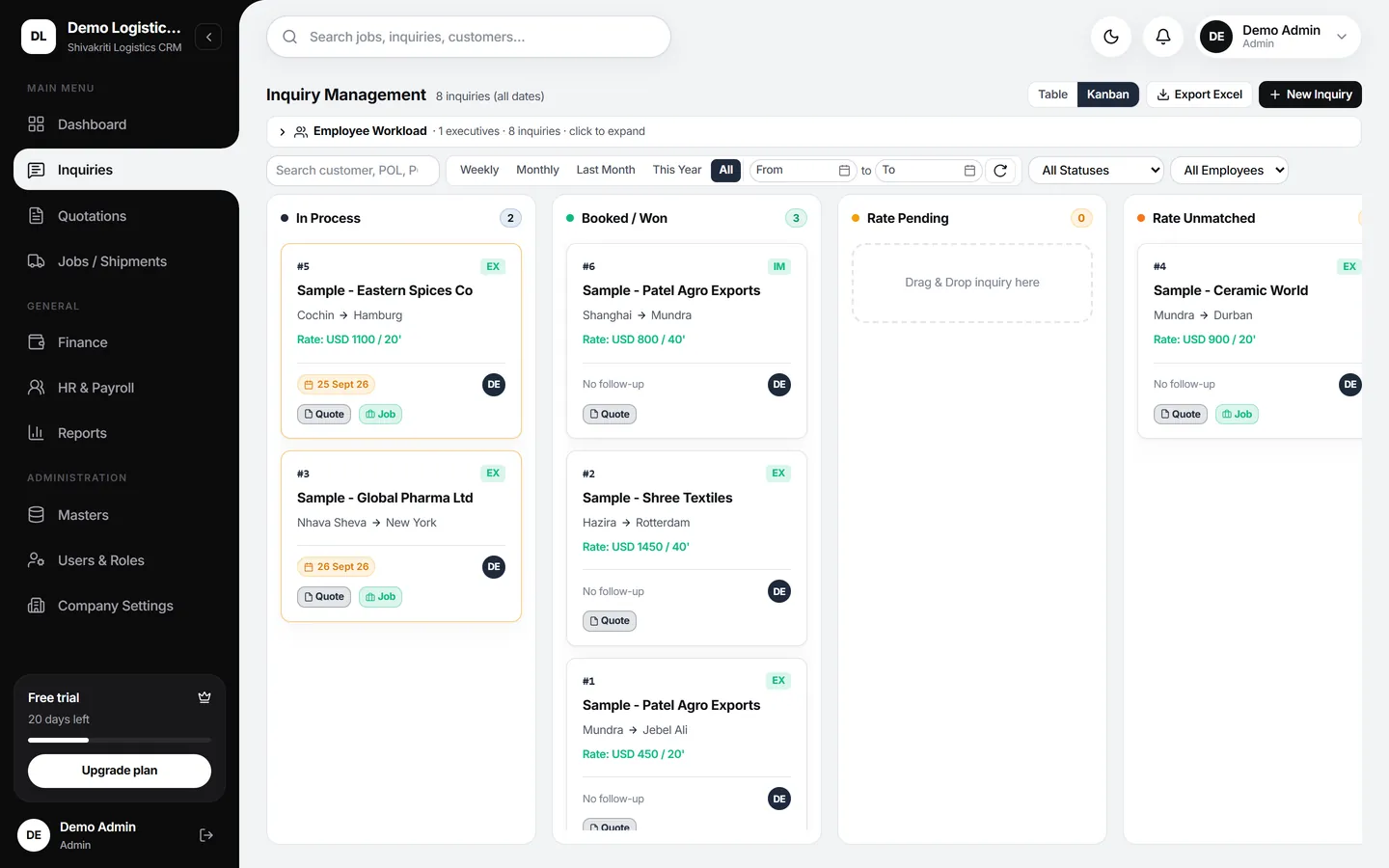
Every enquiry on one board, from first call to booked.
Drag a card from In Process to Booked. Filter by week, month, status or the person chasing it.
- Table or Kanban view, with an Excel export
- Follow-up dates that show up when they’re due
- One click turns an inquiry into a quotation or a job
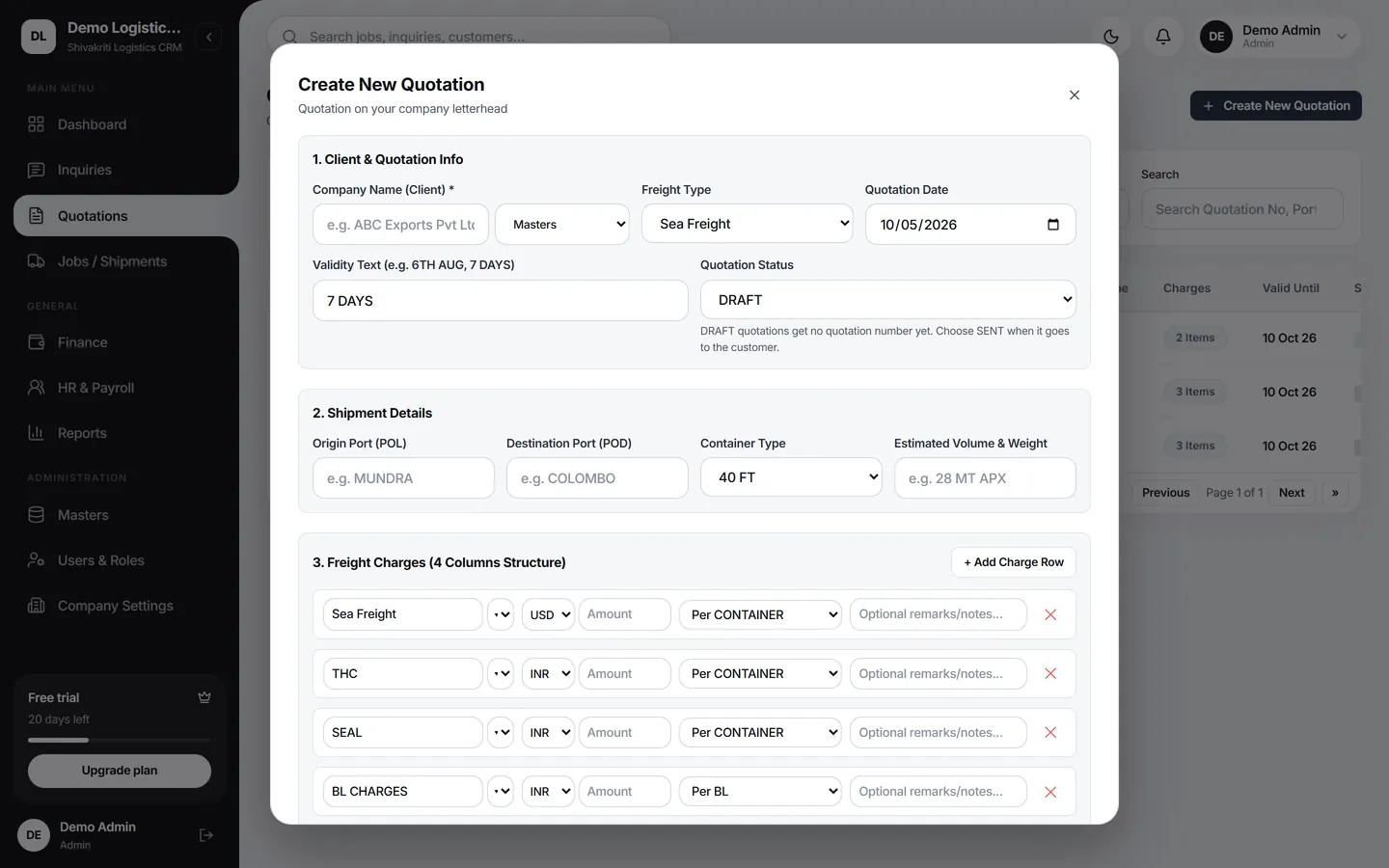
Charge heads in USD and INR, on your letterhead.
Ocean freight in dollars, THC and BL charges in rupees. The quotation prints as a PDF in your company’s name.
- Sea or air freight, per container, BL, CBM or KG
- Drafts stay unnumbered until you send them
- E-mailed to the customer from the CRM
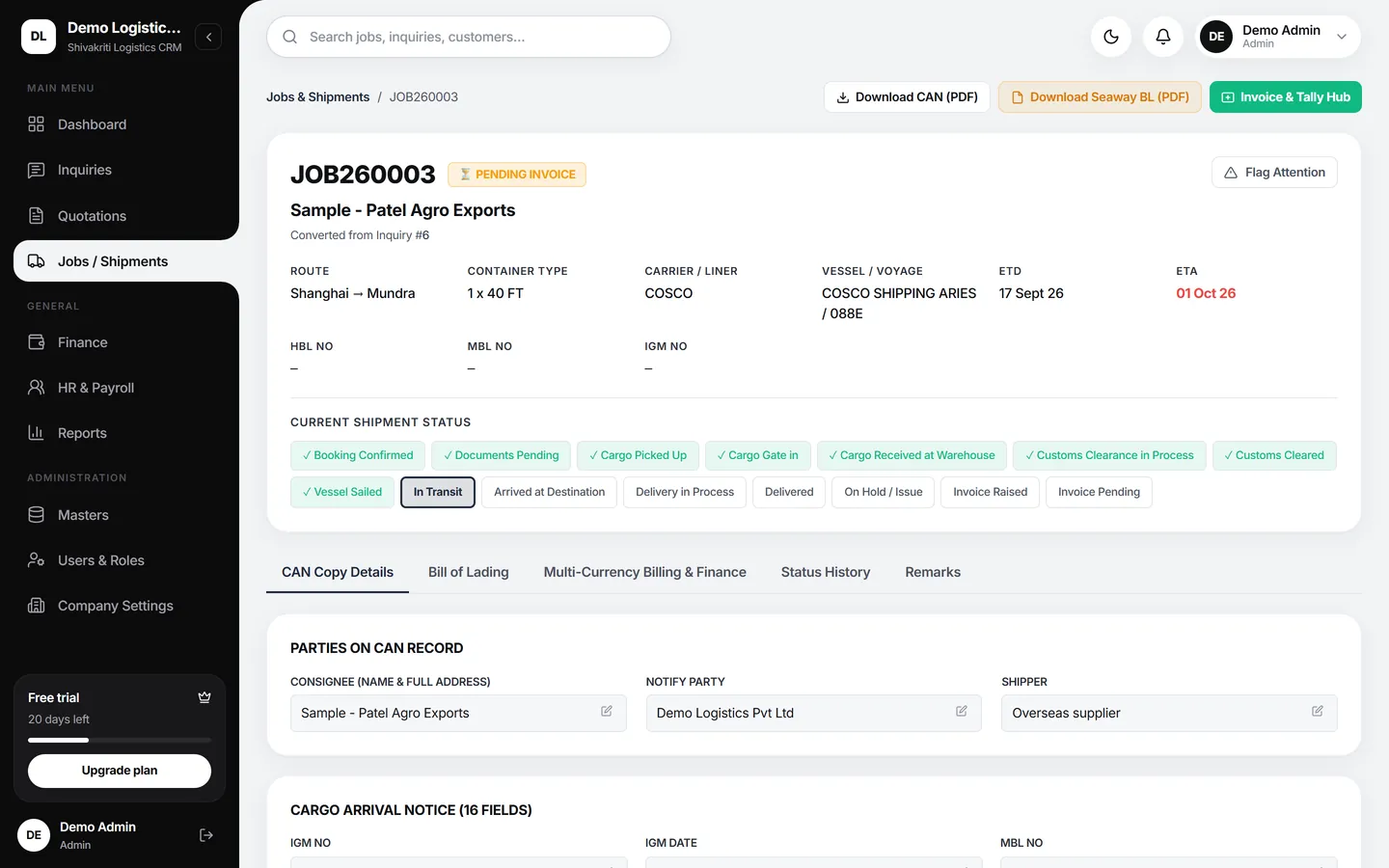
Where the shipment is, without ringing anyone.
The status line moves with the job, from booking to delivered. Overdue ETAs turn red on the dashboard.
- Carrier, vessel, voyage, ETD and ETA on the job
- IGM, MBL and HBL numbers kept for the CAN
- Status history shows who changed what
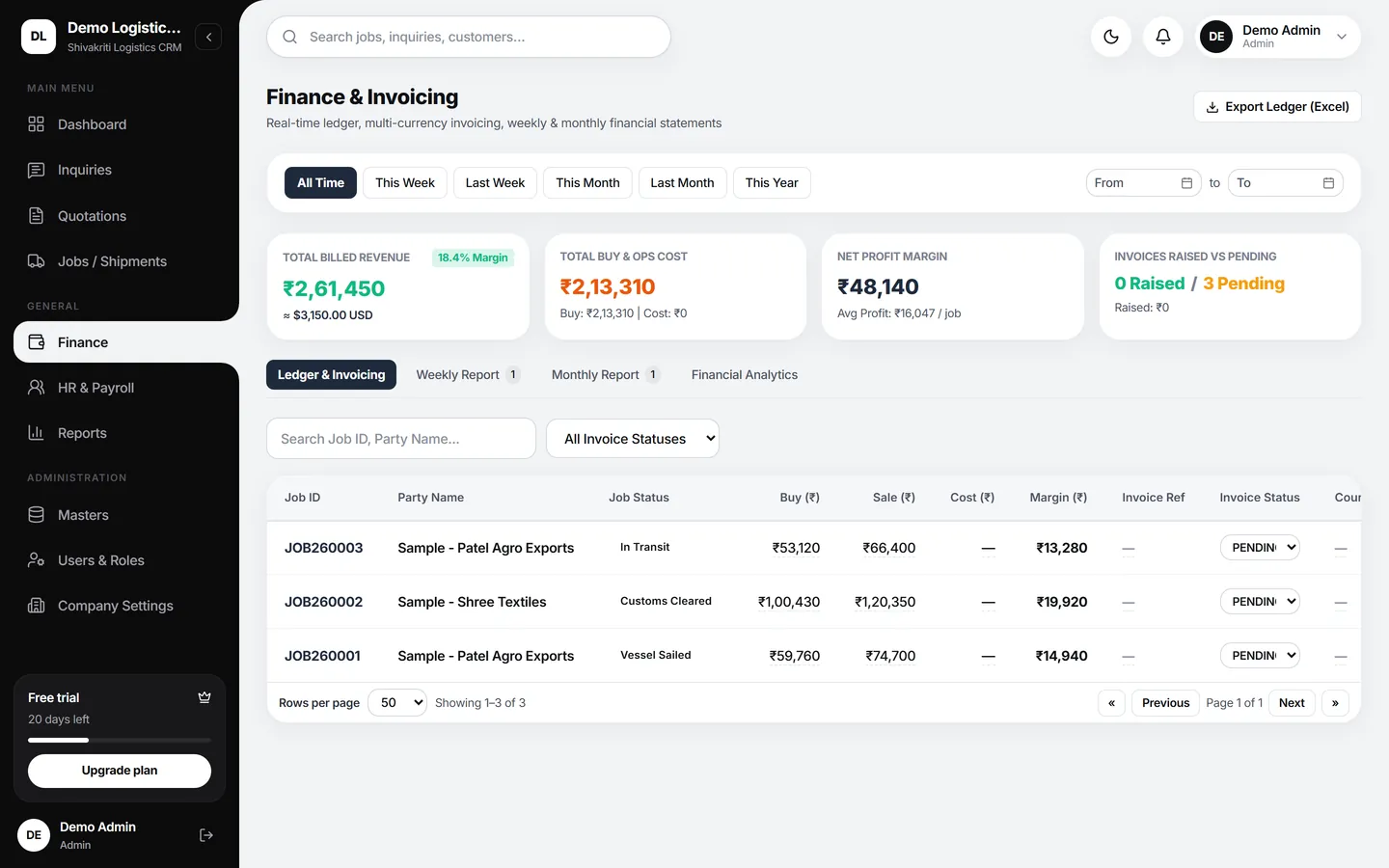
What each job made you, and what’s still unpaid.
Buy, sale and margin per job in rupees, with the USD figure beside it.
- Ledger exported to Excel in one click
- Weekly and monthly statements
- Invoice status per job: raised or pending
Paperwork that prints
from the job.
Four PDFs with your logo, address, GSTIN and PAN. Nothing is typed twice: the consignee on the CAN is the consignee on the BL.
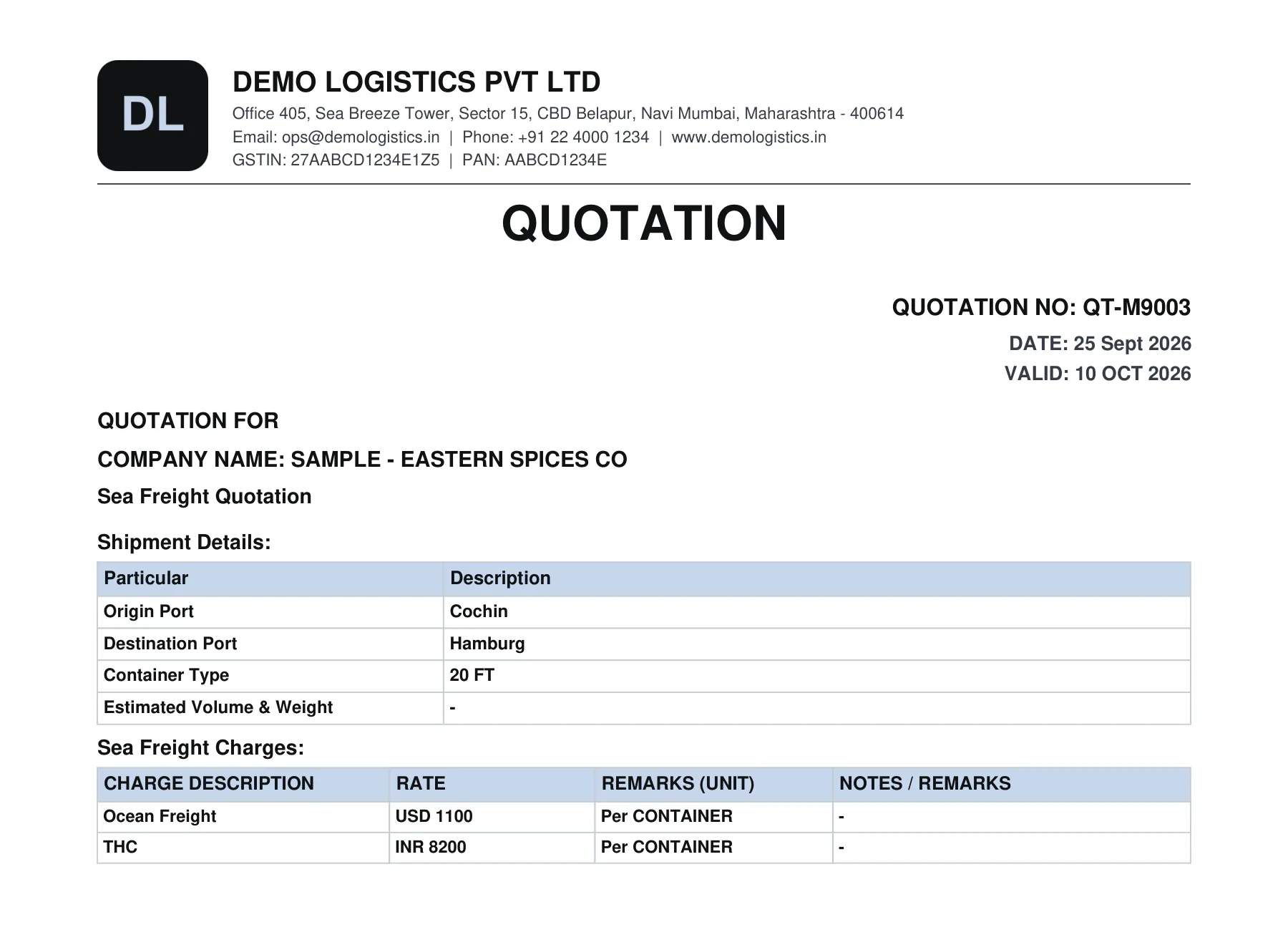
Quotation
Sea or air freight, charge by charge, with the rate in USD or INR and the unit beside it.
What’s on it
- Quotation number, date and validity
- Origin, destination, container type, volume and weight
- Each charge with its rate, currency and unit
- Routing, transit time, free days and your terms
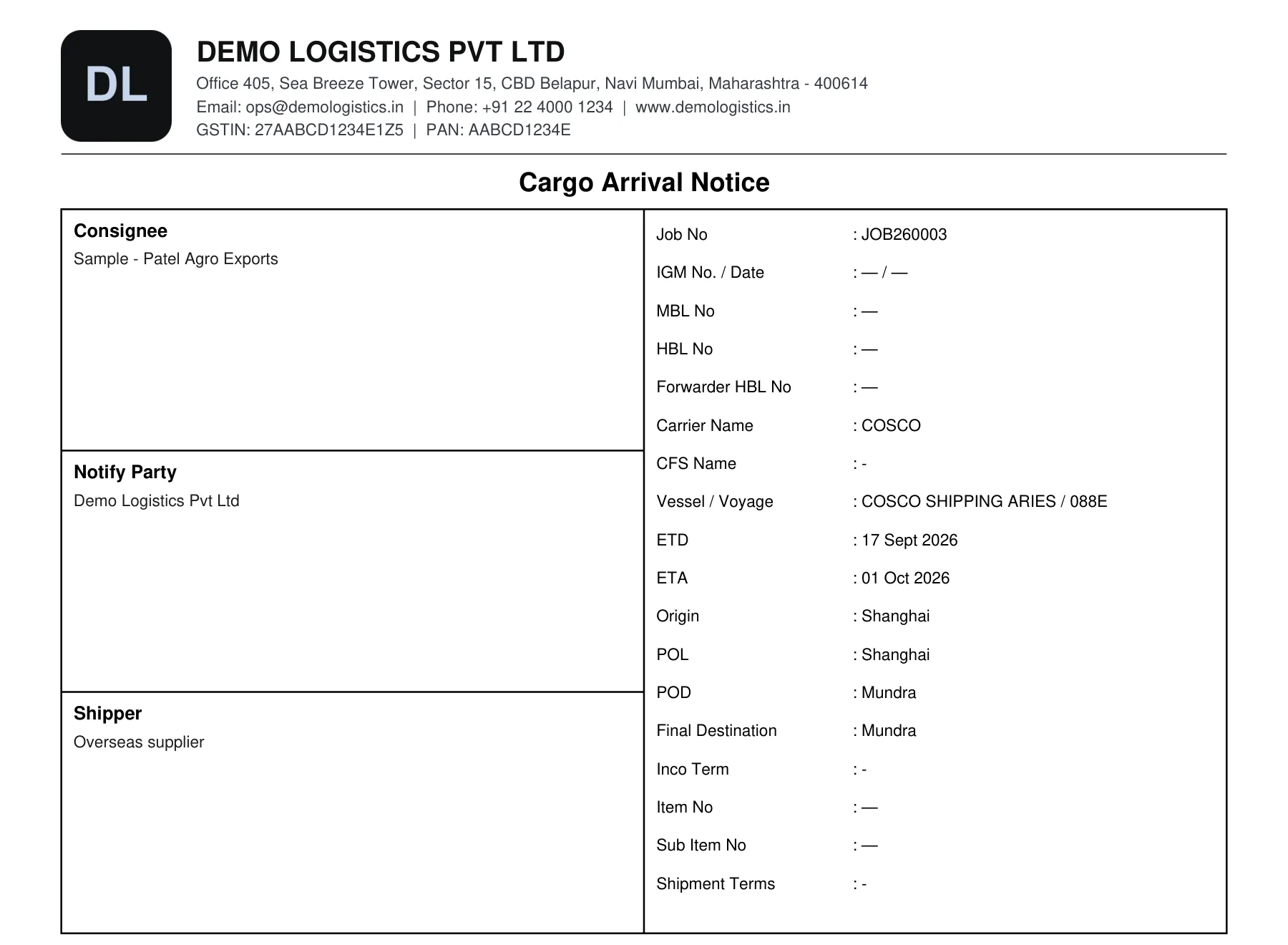
Cargo Arrival Notice (CAN)
Filled from the import job, so the IGM, MBL and HBL numbers are typed once.
What’s on it
- Consignee, notify party and shipper
- Job number, IGM number and date, MBL and HBL
- Carrier, CFS, vessel, voyage, ETD and ETA
- Marks, container, seal, packages, weight and CBM
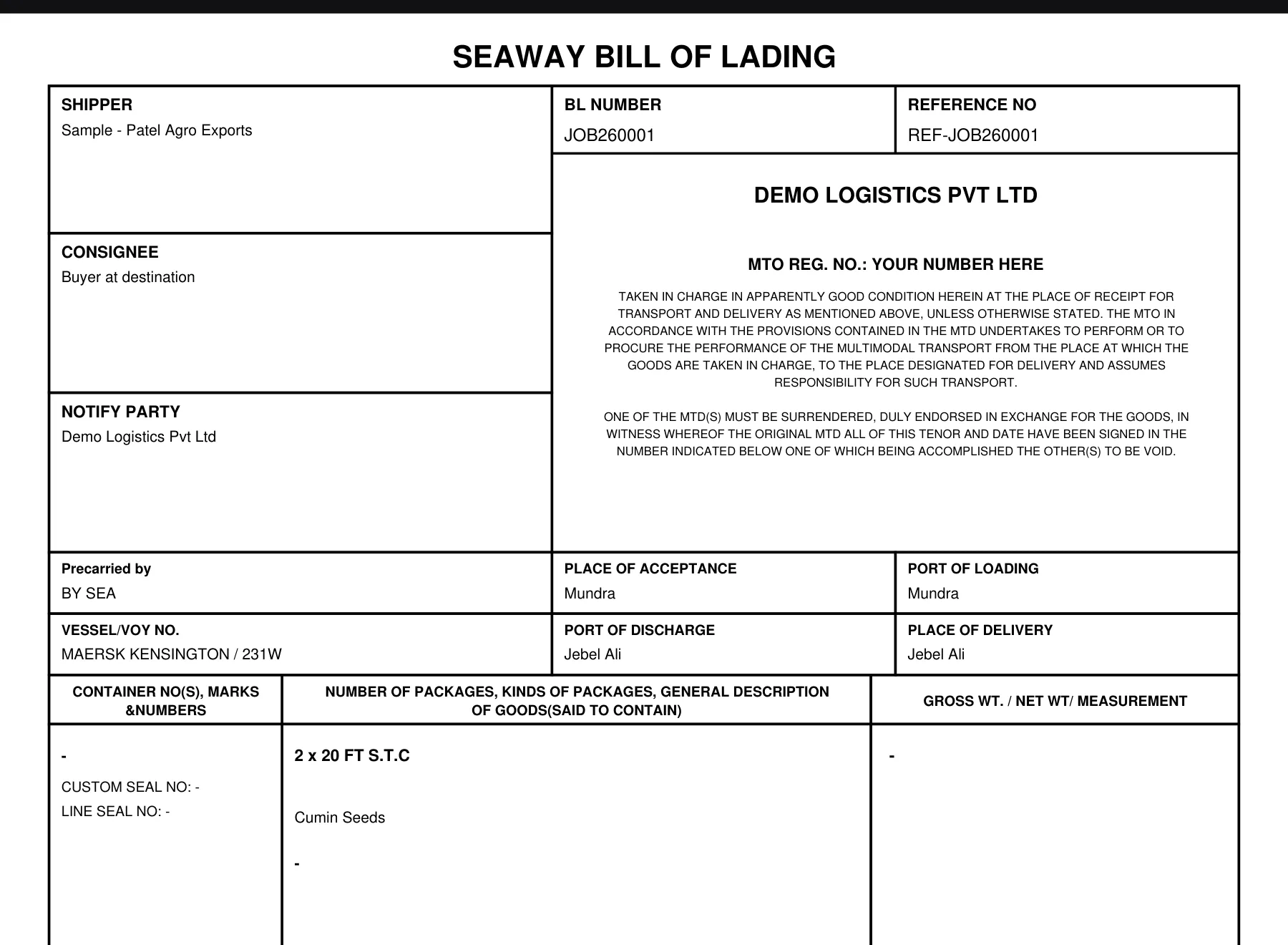
Seaway Bill of Lading
Issued in your company’s name, with your MTO licence number at the top.
What’s on it
- BL number and reference
- Shipper, consignee and notify party
- Place of acceptance, POL, POD and place of delivery
- Containers, seals, packages, weights and description
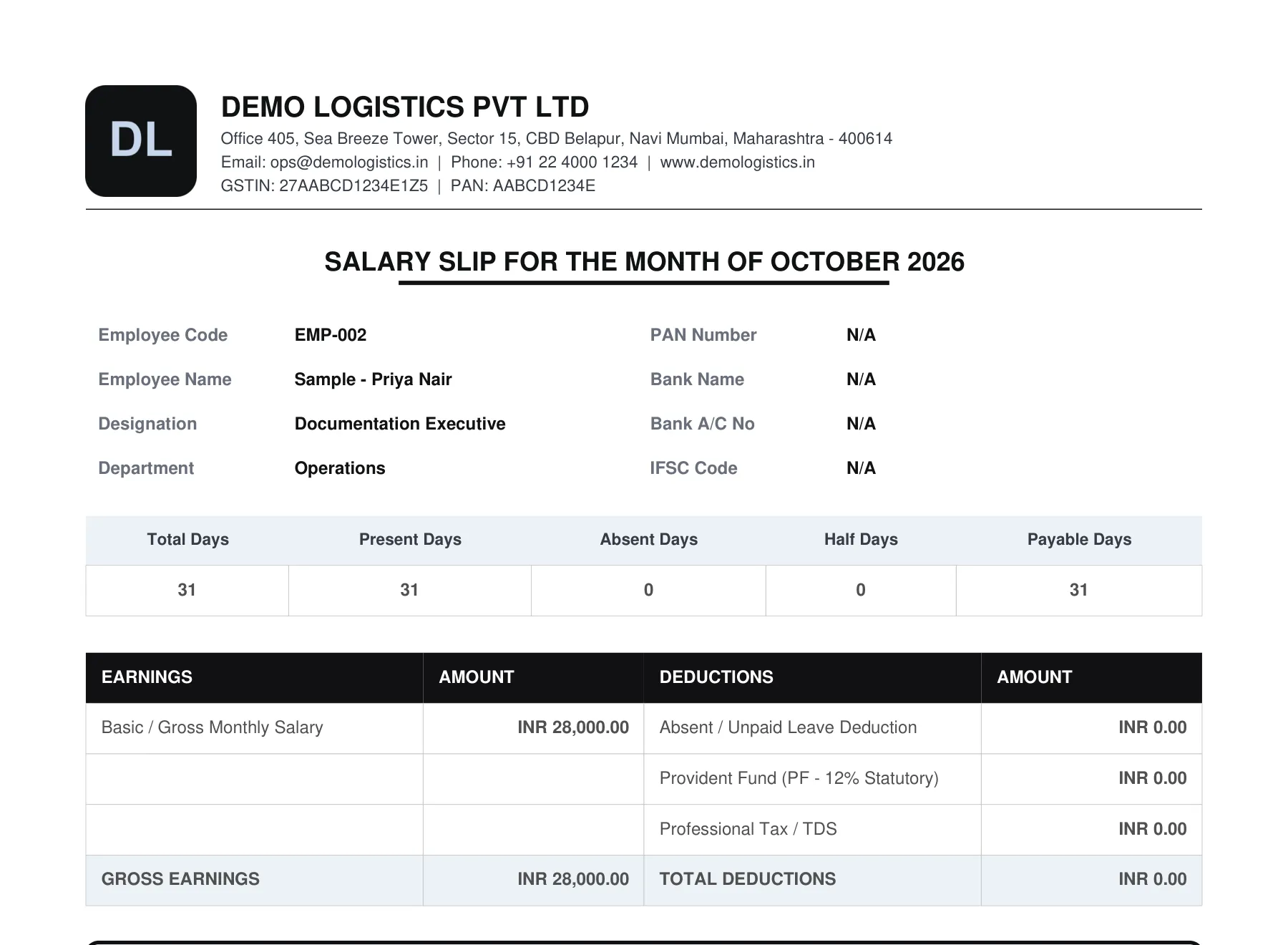
Payslip
Made from attendance, with the net salary in figures and in words.
What’s on it
- Employee code, name, designation and department
- Total, present, absent and payable days
- Earnings and deductions: PF, professional tax or TDS
- Net salary in figures and in words
Sea, air
and customs.
Sea freight
FCL and LCL, per container or per BL. The liner, vessel and voyage sit on the job, and the CAN and Seaway BL print from it.
- FCL / LCL
- 20 FT · 40 FT · 40 HC
- CAN
- Seaway BL
- 18 lines
Air freight
Air freight quotations with charges per KG, in USD or INR. Airlines sit in your masters with their IATA codes.
- Air quotation
- Per KG
- USD / INR
- 8 airlines
Customs and transport
Customs brokers, transporters and overseas agents are kept as masters. The IGM number and date go on the job and print on the CAN.
- CHA
- Transporter
- Overseas agent
- IGM
- 2 ICDs
Against how
you work now.
| Feature | Excel + WhatsApp | Tally alone | Generic sales CRM | Shivakriti |
|---|---|---|---|---|
| Inquiry pipeline | Partly: A sheet and a chat history | No: Not what it’s for | Yes: Yes, for sales leads | Yes: POL, POD, cargo and rate on each inquiry |
| Quotation on letterhead in INR + USD | Partly: Typed up in Word or Excel | No: Accounting vouchers, not freight quotes | Partly: Generic quote templates | Yes: Charge heads per container, BL, CBM or KG |
| CAN and BL from the job | No: Retyped each time | No: No | No: No | Yes: Filled from the job |
| Per-job margin | Partly: If someone keeps the sheet current | Partly: With a cost centre per job | No: Deal value, not buy and sale | Yes: Buy, sale and margin in INR and USD |
| Role-based visibility | No: Whoever has the file sees it all | Yes: User security levels | Yes: Yes | Yes: 6 roles; sales sees only its own |
| Setup time | Yes: Already in use | Yes: Already in use | Partly: Custom fields for ports and containers first | Yes: Same day; ports and lines preloaded |
| Pricing model | Yes: Already paid for | Yes: Licence you already own | Partly: Usually per user, per month | Yes: One plan per company, users included |
Separate, private
and kept in India.
- The database runs in Mumbai. Connections are encrypted, and your data is never sold or used for advertising.
- Every query is scoped to your company in the data layer, not just hidden on screen.
- The database refuses any record written without a company, and automated tests check this on every release.
- Nothing is deleted if you stop paying. The CRM locks at the end of the paid period, then it all comes back when you pay.
- Sample data clears in one click when you’re done looking around.
Working the same day.
- 1
Sign up
Your company, your e-mail and a password, then choose a plan and pay online. 36 ports, 18 shipping lines and 8 airlines are already loaded.
- 2
Put your name on it
Add your logo, address, GSTIN, PAN and MTO licence in Company Settings. Your paperwork is ready.
- 3
Bring your team in
Add staff as Sales, Finance, Operations or Quotation. Each person sees only what their job needs.
About the
Logistics CRM.
No. You choose a plan when you sign up and pay its first month, and your CRM opens as soon as it’s paid. Tick “sample data” at sign-up to look around with example records, then clear them in one click.
One plan per company with users included, and extra users added as you grow. Current plans and prices are on logistics.shivakriti.in.
The CRM locks at the end of the period you paid for. You can still sign in and reach the payment page. Nothing is deleted, and paying switches everything back on at once.
In India: the database runs in Mumbai. Each company’s records are kept separate, connections are encrypted, and your data is never sold or used for advertising.
Only if you let them. Sales staff see their own inquiries, jobs and quotations by default. There are 6 roles, and you can set view, add, edit and delete rights for each person, module by module.
Not directly; there’s no live Tally sync. Finance exports the job ledger to Excel in one click, with buy, sale, cost, margin and invoice status per job. Your accountant posts it into Tally from there.
Yes. Customers, ports, shipping lines, CHAs, transporters and agents live in Masters. You add to them as you go, and they belong to your company alone. Our team can also load your spreadsheets for you as a one-time service.
A browser. It works on a laptop, and the screens fold down to a phone for checking a shipment on the move.
Run your next shipment
through it.
Sign up, pay online and your CRM opens the same day, with sample data to look around. A call with us is one click away if you want a walkthrough first.
